Overview
Imagine a lawn that stays perfectly manicured without you lifting a finger. For the past month, that’s been my reality—thanks to the Anthbot M9, a robotic mower that I command entirely from my iPhone. This guide walks you through everything you need to know to set up, configure, and maintain your own Anthbot M9, transforming your yard into a golf-course-worthy landscape with minimal effort.
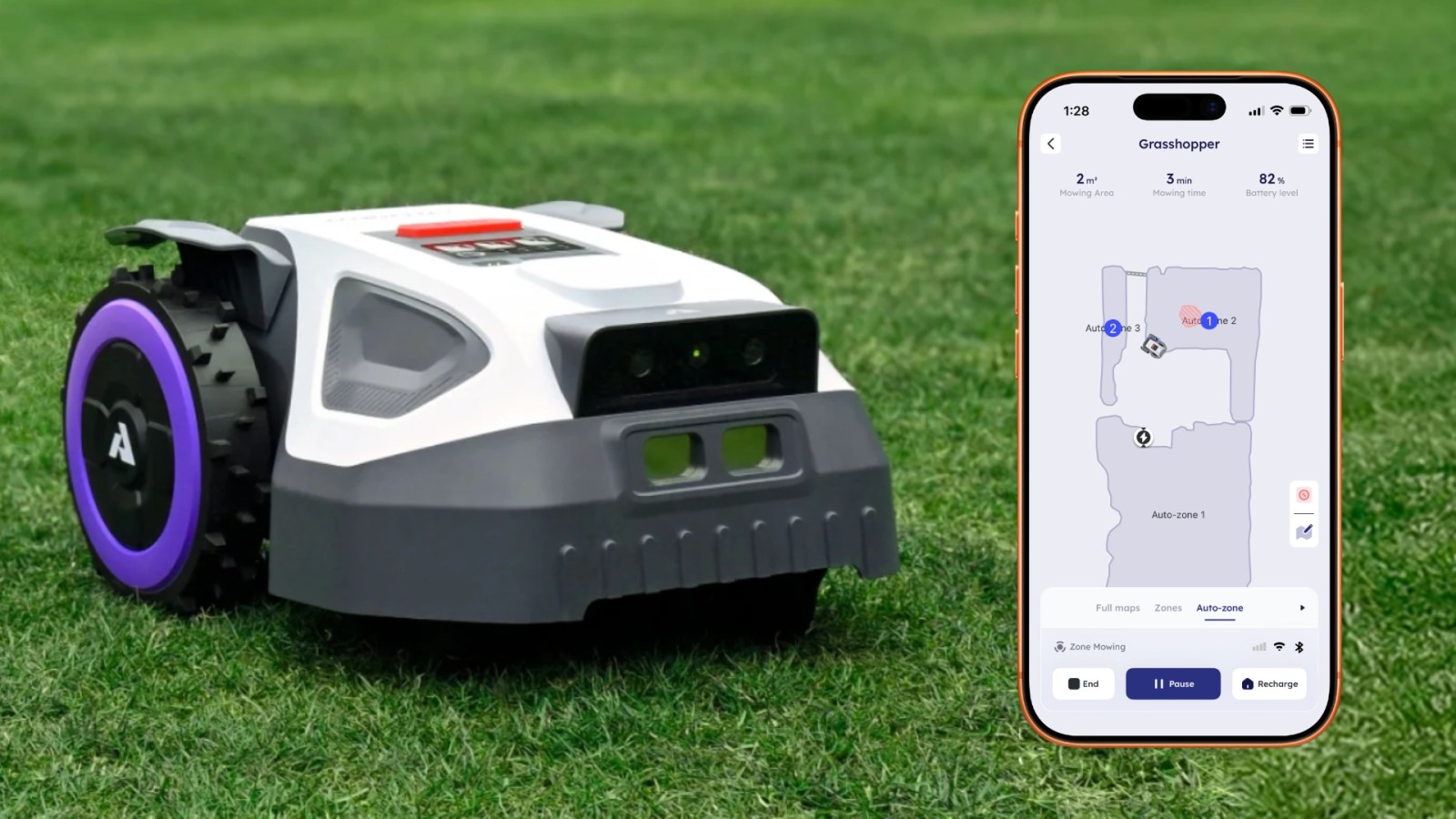
The Anthbot M9 is not just another gadget; it’s a fully autonomous lawn care system that uses boundary wires, sensors, and a companion iOS app to map, schedule, and execute your mowing tasks. Whether you’re a tech enthusiast or a busy homeowner, this tutorial will help you go from unboxing to a perfectly trimmed lawn in a few hours.
Prerequisites
Hardware Requirements
- Anthbot M9 robot mower (including charging station, power adapter, and boundary wire)
- iPhone running iOS 13 or later (for the Anthbot app)
- Boundary wire kit (typically included with the mower)
- Pegs or staples for securing the boundary wire to the ground
- Measuring tape and wire cutter (for trimming excess wire)
Software Requirements
- Download the Anthbot app from the App Store (search “Anthbot”)
- Ensure your iPhone has Bluetooth 4.0 (or newer) and Wi-Fi connectivity
Preparation Steps
- Choose a flat, open area in your yard for the charging station—ideally near a power outlet.
- Remove any obstacles like large rocks, hoses, or toys that could block the mower.
- Map out the perimeter of your lawn where you’ll lay the boundary wire.
Step-by-Step Setup Guide
1. Installing the Charging Station
Place the charging station on level ground at the edge of your lawn. Connect the power adapter and plug it into a weatherproof outdoor outlet. The station will emit a low beep to confirm it’s powered. Tip: Position it so the mower can approach from a straight line—angled paths can cause docking errors.
2. Laying the Boundary Wire
The boundary wire defines the mowing area. Use the included pegs to secure it around the perimeter, leaving about 6 inches of clearance from flower beds or fences. For narrow passages, twist the wire at pinch points to create a single path. Use a wire cutter to trim excess, but leave a small loop at the starting point for connection to the station.
3. Connecting to the App
Open the Anthbot app on your iPhone. If this is your first time, create an account or sign in using Apple ID. The app will prompt you to pair the mower via Bluetooth—select “Anthbot M9” from the list. Once paired, the mower will sync its firmware automatically. You’ll then need to connect the app to your home Wi-Fi for remote scheduling and over-the-air updates.
4. Calibrating the Mower
In the app, navigate to Settings > Boundary Calibration. Follow the on-screen instructions: the mower will test the wire by driving along it. This takes about 15 minutes. If you see a “Wire detected” message, you’re good. If not, check for breaks or loose connections.
5. Setting a Mowing Schedule
Tap the Schedule icon on the home screen. You can set specific days and times—e.g., Monday, Wednesday, Friday at 7 AM. The mower will automatically return to the charging station when its battery runs low. Pro tip: Start with a daily schedule during peak growing season, then reduce as needed.

6. First Test Run
Press Manual in the app and tap “Start Mowing.” Watch the mower navigate its first lap. It may bump into obstacles a few times—this is normal; the sensors learn over time. After 30 minutes, let it complete a cycle and dock on its own.
Common Mistakes to Avoid
Boundary Wire Issues
- Not securing the wire tightly: Loose wire can be cut by the mower’s blades. Use pegs every 2 feet.
- Creating sharp angles: The mower can’t handle 90° corners. Gradual curves (radius > 6 inches) work best.
- Ignoring wire overlaps: If the wire crosses itself, the mower will get confused. Use separate paths for islands.
App Connectivity Problems
- Weak Bluetooth signal: Keep your iPhone within 10 meters during setup. For long-term use, ensure Wi-Fi is strong in the yard.
- Outdated app version: Check for updates weekly—Anthbot frequently patches bugs.
Battery and Charging Errors
- Parking station misalignment: If the mower fails to dock, adjust the station’s position by moving it left or right in 1-inch increments.
- Running in extreme heat: The battery can overheat in direct sun above 35°C (95°F). Schedule mowing early morning or evening.
Ongoing Maintenance Tips
Cleaning the Undercarriage
After two weeks of use, grass clippings and debris can accumulate under the chassis. Flip the mower over (battery removed) and use a soft brush to clean the blade area. This prevents clogs and keeps the cutting deck level.
Blade Replacement
The Anthbot M9 uses razor-like blades that dull over 4–6 weeks. Replace them in sets of three. The app will send a notification when it’s time—don’t ignore it, or you’ll get uneven cuts.
Winter Storage
If you live in a frost-prone area, bring the mower and charging station indoors at the end of the season. Disconnect the battery and store it at room temperature. The boundary wire can stay in the ground.
Summary
With the Anthbot M9 and your iPhone, you can achieve a manicured lawn without weekly manual labor. By following this guide—setting up the boundary wire, pairing the app, and establishing a schedule—you’ll automate your lawn care in under two hours. The result? A yard that looks like a golf course, even if you haven’t touched a mower in a month.